Translate

Saturday, February 10, 2018

HTC U12 Release Date, Specs & New Feature Rumours


HTC used to be right up there with Apple, Samsung, LG and Sony in terms of how much hype we saw around its flagship launch. Fast-forward to 2018 and we're not even expecting an HTC flagship to be announced at this year's MWC tradeshow - though the HTC U12 is coming, and it's been recently spotted at a 5G conference (see image above, via @iamaniff).
Also see: What to expect from MWC 2018

When is the HTC U12 release date?

You'll probably have heard that last year HTC made a deal with Google. It was not a buyout or acquisition, but the 'Cooperation Agreement' did include $1.1bn in cash and the transfer of some HTC employees to Google. The search giant also received a non-exclusive licence for HTC intellectual property, though the phone maker has continued to make and sell devices.
A statement from HTC at the time suggested that the company would retain "best-in-class engineering talent", which is "currently working on the next flagship phone".
HTC's last three flagships have been announced in March, April and May. Our money is on May for the successor to the HTC U11.

What are the rumoured new features and specifications of the HTC U12?

There are a couple of interesting concepts out there giving us a look at what HTC's 2018 flagship might look like, as well as leaked images from a 5G conference that reportedly show the HTC U12 in the flesh.
HTC U12
The first concept, below, shows a design similar to the Samsung Galaxy S8 and LG G6. It features tiny bezels at the top and bottom in order to fit in a 5.7in 4K display with curved corners, according to Gizmochina.
HTC U12 leak
Another leak shows a non-descript black slab - that GMSArena claims is the HTC U12. Make of it what you will, but the power and volume positions of the keys are the same as on the U11:

More design changes are in force with HTC going back to a metal casing, rather than the shiny glass of the U11 and there's no visible fingerprint scanner. Gizmochina suggests that Qualcomm's under-display sensor tech will be in use.
Other rumours specs include a Qualcomm Snapdragon 845 processor, 6GB of RAM and 128GB of storage. The chip rumour is backed up by a report that claims a leaked document shows phones in 2018 that will get the 845. It looks a tad suspect, mind you.
There might also be JBL speakers but no headphone jack, a 16Mp front facing camera and dual rear cameras.
The concept of dual-cameras has seemingly been confirmed by HTC itself, which says it will start producing dual-camera phones again next year.
Another HTC U12 concept looks similar at the front, albeit with stereo speakers and no rounded corners on the screen. At the back it's also showing a metal design but a single camera and fingerprint scanner.

157 New Emojis Including Woozy Face and Pirate Flag are Coming to Your Phone Later This Year

157 New Emojis Including Woozy Face and Pirate Flag are Coming to Your Phone Later This Year
The Unicode Consortium has released Emoji 11.0 data with 157 new emoji characters, bringing the total number of approved emojis to 2,823. The latest emoji list, which is "fixed and final," includes a man and woman emoji in various hairstyles, including red-haired, curly-haired, white-haired, and bald, as well new superhero and supervillain characters in multiple skin tones. All the newly made emojis should be available on mobile phones and other devices sometime in August or September. In the meanwhile, sample images suggesting the new emojis are available on the Web.
Emojipedia, which is an online encyclopedia for emojis, has developed a video to give a glimpse of all the new emojis that are coming this year. The nearly two-minute video shows various new faces, including a partying face, pledging face, woozy face, smiling with 3 hearts, hot face, and cold face. Similarly, there are emoji characters defining living beings other than humans, such as a microbe, mosquito, parrot, peacock, badger, raccoon, swan, kangaroo, and lobster among others. There are also science-centric objects in the form of a test tube, petri dish, and DNA.
The new emoji characters are currently available as "just samples", which means software vendors will be able to design their own emoji sets. This will mainly help Apple, Google, and Microsoft to construct emoji characters as per their requirements and make them compatible with their software. Moreover, the version number for the newest Unicode emoji release is jumping directly from the previously released Emoji 5.0 to Emoji 11.0, instead of a 6.0 version, to synchronise the version number for emojis with the corresponding version number of the Unicode Standard.
You can expect the new emoji release on your Android or iOS devices in the coming months. Moreover, apps such as Facebook Messenger and WhatsApp are likely to include the new emoji characters later this year.
Last year, emoji characters were in the headlines multiple times. There was an intense debate on Twitter over the cheese placement in a burger that brought an update to Android's original cheeseburger emoji. Separately, the middle finger emoji on WhatsApp saw an allegation of obscene and lewd gesture. WhatsApp even faced a legal notice by a Delhi-based advocate for having the objectionable emoji on its platform
.

Xiaomi, Vivo, Oppo, Others to Use Qualcomm 5G Modem With First Devices Coming in 2019

Xiaomi, Vivo, Oppo, Others to Use Qualcomm 5G Modem With First Devices Coming in 2019
More than a dozen global smartphone and PC OEMs have tied up with Qualcomm to incorporate the Snapdragon X50 5G NR modem on to their mobile devices. Qualcomm has said the first smartphones featuring its X50 5G NR modem will hit the market in 2019, with Chinese brand Vivo promising such a handset next year. Major mobile phone OEMs joining hands with Qualcomm to incorporate the 5Gmodem in their future smartphones include the likes of Xiaomi, Nokia brand licensee HMD Global, Sony, LG, HTC, Oppo, and ZTE.
Other OEMs that have partnered with Qualcomm are Fujitsu, Inseego/ Novatel Wireless, NetComm Wireless, Netgear, Sharp, Sierra Wireless, Telit, Wingtech, and WNC. Devices by these OEMs will be built around the sub-6GHz and millimetre wave (mmWave) spectrum bands starting next year.
Apart from smartphones, the new Snapdragon X50 5G NR modem will be available on Always Connected PCs, Head-Mounted Displays (HMDs) - including Virtual Reality (VR), Augmented Reality (AR) and Extended Reality (XR) - and Mobile Broadband. Qualcomm claims this technology will offer faster browsing, faster downloads, better streaming, and instant cloud access on phones. The modem will enable high speed and low latency for Always Connected PCs, and ultra-low latency for HMDs.
"As evidenced by our work with these distinguished OEMs from around the globe and as we demonstrated in 3G and 4G LTE, Qualcomm Technologies is utilizing our deep expertise and technology leadership to support the successful launch of 5G NR, driving innovation in the mobile ecosystem," said Alex Katouzian, Senior Vice President and General Manager, Mobile, Qualcomm Technologies.
Separately, Qualcomm has also partnered with several wireless network operators in the above mentioned sub-6GHz and millimetre wave (mmWave) bands. These include AT&T, British Telecom, Sprint, China Telecom, China Mobile, China Unicom, NTT DOCOMO, Orange, Verizon, Telstra, Singtel among others. The upcoming trials will combine Qualcomm's 5G platform and smartphone reference design with an aim to commercialise compliant 5G products later this year.
To further showcase this, planned demonstrations will be held at this year's Mobile World Congress in Barcelona. The Qualcomm booth is expected to have Snapdragon X50 modems reaching speeds of "several gigabits per second."
A HTC handset with 5G support, said to be the U12, was recently showcased at an industry event in Taiwan. The handset was shown delivering download speeds of 809.58Mbps.

Myetherwallet Relaunches as Mycrypto Following a Hostile Twitter Takeover


Myetherwallet Relaunches as Mycrypto Following a Hostile Twitter Takeover

Myetherwallet, the web’s most popular client-side ethereum interface, has announced a surprise rebrand. The service will henceforth be known as Mycrypto following an acrimonious split. The sudden move took one half of the Myetherwallet team by surprise, who claims the “Twitter handle was changed without knowledge or permission of MEW’s founder”. It has also emerged that a lawsuit was filed in December, with one party alleging that the other failed to allow them to inspect the company’s books. It now looks like there will be two competing brands moving forward, Myetherwallet and Mycrypto.

Myetherwallet Hard Forks

Myetherwallet Relaunches as Mycrypto Following a Hostile Twitter Takeover
Mycrypto’s Taylor Monahan
On Thursday evening, the Myetherwallet Twitter account announced to its 77,000 followers that it had rebranded as Mycrypto and had a new Twitter handle to match. There was just one problem: founder Taylor Monahan doesn’t seem to have told her co-founder Kosala. The revelation sparked a Twitter spat and overshadowed what had initially looked like a slick rebrand. The first ethereum wallet with a proper interface, MEW, as it’s affectionately known, has been around since 2015.
Its users witnessed the DAO hack and subsequent hard fork of the ethereum blockchain to create two versions of the coin: ETH and ETC. Now, MEW has undergone its own hard fork that’s set to be every bit as contentious as the one that came in the wake of the DAO. In a blog post, Taylor explained the reasons behind the rebrand – but conveniently forgot to mention that she had done so without the consensus of her founding partner, and had nabbed the Twitter account into the bargain. In December, Kosala filed a lawsuit in California after Taylor allegedly refused to let him inspect MEW’s books.
Myetherwallet Relaunches as Mycrypto Following a Hostile Twitter Takeover
Headed “A New Beginning”, the post begins: “This is the story of Myetherwallet, and how this has led us down the path to Mycrypto. It is long because I hope it gives you insight into who we were, who we are, and who we aim to be in 2018 and beyond.” The article then delves into MEW’s humble beginnings in 2015 when it was created by Taylor and Kosala. She explains: “It was a simple interface that provided a simple solution to a problem: when Ethereum first launched, the only way to send your Ether was via command line.”
Myetherwallet Relaunches as Mycrypto Following a Hostile Twitter Takeover

The ICO Years

Myetherwallet started out as little more than a hobby, but by 2017, amidst peak ICO mania, had become the hub around which the entire ethereum community revolved. Taylor recalls:
When the price skyrocketed, ICOs and noobs came zooming in on the promise of getting rich. We suddenly had a real user base and real servers that we had to learn to scale. The phishing sites appeared and the work and expertise to be secure in this space climbed steadily. Our daily messages doubled, and then doubled again… and again… and again.
She confesses that the toll of answering support tickets until long into the night took its toll. “My husband..cooked dinner each evening, and carried me to bed at 4am… then 5am… then 7am when I fell asleep typing at the computer. I consistently chose “trying to help one more person” over “a few more moments of sleep”. And there was “always one more person.”

Mighty Wallets From Tiny Acorns Grow

Moving to the present day, Taylor explains: “This adventure needed to transform from ‘fun side project’ to ‘a real company’ …and fast.” As of today, ethereum users can get their ethereum fix from Mycrypto.com which operates just like Myetherwallet.com. “Myetherwallet will continue to be online until it, for whatever reason, is not online,” writes Taylor, hinting at the fact that the rebrand may not have been a unanimous decision.
It is evident that a rift had developed between MEW’s founders, who had once been so tight, for Taylor writes: “I was terrified — am terrified — at the potential harm this change will have on myself, the team, and/or the Ethereum community but ultimately, the risks created by continuing down the road we were on are greater than the risks of splitting to a new brand, new company, new name, and new domain.”
The Ethereum community are accustomed to dealing with splits, but the forking of Myetherwallet seems to have caught everyone unawares.Within minutes of tweeting news of the rebrand, Kosala hit back via a new MEW Twitter account, writing: “Myetherwallet is safe and functioning normally. You may continue to use Myetherwallet as you normally would, your wallets have not been compromised. At present, we are dealing with  what we believe to be an unlawful, social media account switch. We are addressing the situation presently and @kvhnuke_ will provide updates as they come available”. He has since provided a full statement confirming the split.

UK banks block Bitcoin purchases with credit cards

Lloyds Banking Group which owns Halifax, Bank of Scotland, MBNA and Lloyds will block Bitcoin purchases with their credit cards. The restriction is applied because the financial institutions worry that their customers might borrow cash to invest in the cryptocurrency and might end up in debt.
UK banks block Bitcoin purchases with credit cards
Bitcoin price jumped from $800 to over $18,000 in 12 months, as the public interest grew. The price is currently under $8,000, and banks are worried their customers might get caught up in the craze and end up maxing out their credit cards.
The same decision was taken last week in the US. Bank of America, JP Morgan Change, and Citigroup credit cards are now blocked from Bitcoin purchases, citing the same reasons. Although some countries are already treating the cryptocurrency as a taxable commodity, governments are still struggling to figure out a proper regulation.

OnePlus 5T Lava Red becomes available in the US and Europe

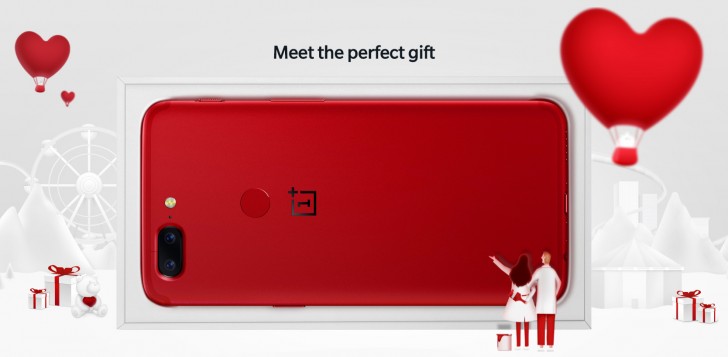
The sale of the Lava Red OnePlus 5T has begun – it’s launching in Europe and the US, following successful launches in China and India.
This is a limited edition model so it won’t be available for long and it only comes with 8GB of RAM and 128GB storage (there's no 6GB/64GB option). The price is the same as the equivalent Midnight Black model - $560/€560/£500.
OnePlus 5T Lava Red becomes available in the US and Europe
OnePlus offers free priority shipping if you order before February 9. Also, hit the Source link and check the bottom of the page – some accessories are 15% off if you buy two (it’s a Valentine’s Day offer).

Telegram adds streaming and auto-night mode on Android

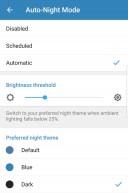
Telegram has added streaming support on the Android app. Videos can now be watched without downloading them first. Clicking on the video will start streaming and you can watch it instantly.
Telegram video streaming auto-night mode auto-night mode
Telegram video streaming • auto-night mode
The update also adds auto-night mode on Android. The app can now automatically switch to the night mode at night or in a dark environment. These changes are available in the latest v4.8 of the app.
Telegram also announced a new login widget for websites. Websites can now have the Telegram widget to authenticate new users, similar to Facebook, Twitter or Google login. While logging in with the Telegram widget for the first time, you will get confirmation message in the app to authenticate your browser. After loggin in, Telegram shares your name, Telegram username and profile picture with the website but nothing else, including your phone number. You can always revoke your authorization at a later date if you wish.
Login confirmation Improved bots
Login confirmation • Improved bots
Along with the widget, Telegram also improved the bots, which can now interact with you directly without you first having to message them. These bots can now be used by services for things such as customer support, accepting payments, or sending notifications for things like delivery status, flight status, account statements, etc.

Deal: used iPhone 6s (Grade A) for just £200

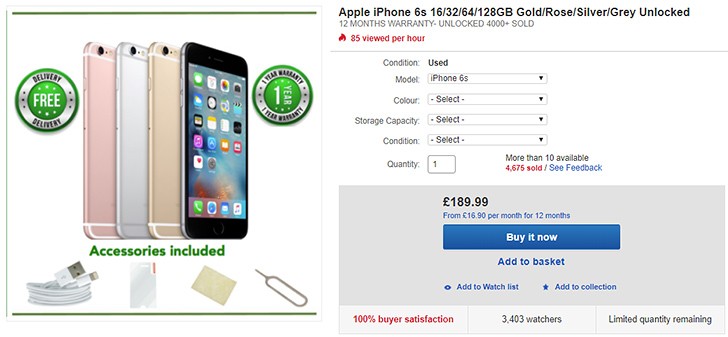
If you’re looking for an iPhone on the cheap, you might have to get one used – Apple slashes its prices very rarely. An iPhone 6s from late 2015 costs £450 new, way too much for a device that’s over two years old. If you do want to get a used one, eBay has a nice deal.
An iPhone 6s with 16GB of storage goes for – used, Grade A - £200 (you can drop to Grade B for £190). 64GB is £245 and 128GB is £310 (32GB is sold out).
You’re getting 12 months of warranty and some generic accessories – USB cable and SIM ejector.
Deal: used iPhone 6s (Grade A) starting from £200
The availability of colors varies so you should check the specific combination you’re looking for. Hit the Source link to check out the deal.

LG V30s with 256GB storage to show up at MWC

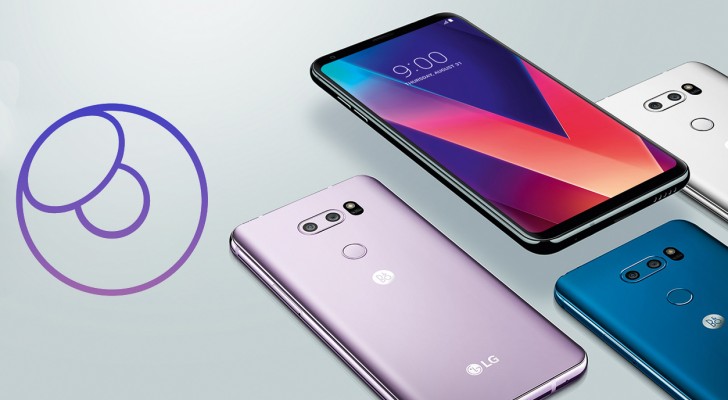
We heard that LG will bring an upgraded V30 to the MWC, though company officials refutedthat this is in lieu of a G7. Anyway, ETNews reports that the upgraded model will be called LG V30s and will focus on AI and something called LG Lens.
The V30s model will have 256GB of built in storage, double what the LG V30+ offers and four times the 64GB of the base model.
LG V30s with 256GB storage reportedly bought a ticket for the MWC
As for LG Lens, it’s the company’s vision-based assistant. You can snap a photo and the AI will recognize the object and seek out prices. Lens can translate text (like QuickTranslator)as well as give you location-based info. It also does barcode and QR code recognition.
The LG V30s is expected to launch in Korea first at a price of around 1 million won ($920/€750).

Alleged specs of the Snapdragon 670 leak online

Now that we’ve heard the announcement of the Snapdragon 845 from Qualcomm back in December, we turn our attention to the headlining model of Qualcomm’s 600-series chips: the Snapdragon 670. This chip is supposed to succeed the popular Snapdragon 660 CPU and its alleged specs have leaked as WinFuture reports.
According to reports, the Snapdragon 670 will be built on the 10nm process, putting it on the same hardware level as the much more efficient higher-end CPUs like the Snapdragon 835 or the Exynos 8895.
The SD 670 will have a modified Cortex A55 cluster with six high-efficiency cores dubbed Kryo 300 Silver. Meanwhile, the higher performance cluster will comprise of two Cortex A75 cores and will be called Kryo 300 Gold. The efficient cores are clocked to 1.7GHz while the higher performance cores will top 2.6 GHz. It's performance will fall somewhere between the Snapdragon 845 and the Snapdragon 660.
Each cluster will have 32Kb of L1 cache, 128Kb of L2 Cache, and 1024Kb of L3 cache altogether.

The Adreno 615 GPU will pair with the Snapdragon 670 and will operate between 430 and 650 MHz with a 700 MHz turbo mode for intensive graphic sessions. The GPU will support dual camera (and likely smartphones equipped with four cameras) but the maximum resolution isn’t known. As a reference, the reference designs for the 670 used a 13MP + 23MP setup.
The chip will feature Qualcomm’s X2x modem, which would be capable of pulling up to 1Gbps (theoretical) speeds. The chip should also support UFS memory and the older eMMC 5.1 flash standard.
The 670’s specs have been leaked back in December, along with a few others like the Snapdragon 640 and the 460, however a few of the 670’s specs don’t match the new reports.
Qualcomm hasn’t actually announced this chip yet, but it might be preparing to do so at MWC given that it’s a widely international mobile conference where an upper-midrange chipset would be an appropriate piece of hardware to show off. As it stands, the 670 was rumored to start appearing in hardware in the first half of the year, so a launch at MWC would only make sense.

WhatsApp is beta testing p2p mobile payments in India

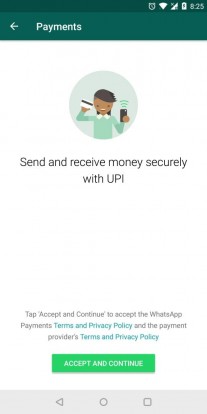
User to user payments on WhatsApp are finally starting to roll out in India, after what we can only surmise was a pretty lengthy development period of over 10 months, since the first public mention of the feature. It is rolling out gradually to beta testers in the country, meaning that a full release should be coming shortly.
In accordance with earlier info, WhatsApp user to user payments are done trough UPI or Unified Payments Interface - India's popular digital payment system, already adopted by all major banks and even some services in the country.
WhatsApp payments interface WhatsApp payments interface WhatsApp payments interface 
WhatsApp payments interface
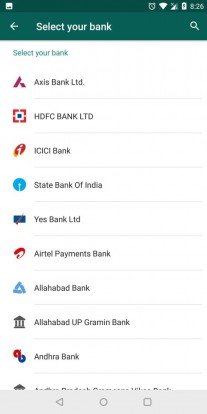
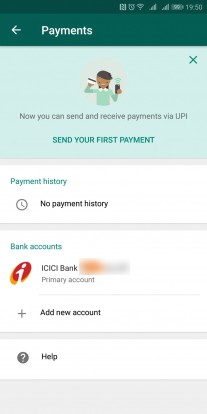
The implementation appears to be very simple and straight-forward. WhatsApp is getting a new "Payments" tab in its settings menu, where you have to enter and verify your bank info and agree to a few service and privacy policies. The menu also holds a detailed log of your payment history, including the two parties and the bank involved.
The payments themselves are handles seamlessly as in-chat attachments. Pretty neat and a great step forward in aiding India’s drive towards a cashless digital economy. Considering WhatsApp's formidable popularity across the country, the new payment system could indeed go a long way in popularizing UPI and the push towards convenient and secure digital transactions.
If you are keen on test-driving the feature, you need to be signed up to be a WhatsApp beta tester (use this link) and have an account at one of the supported Indian banks, which include Axis Bank, State Bank Of India, Yes Bank, ICICI Bank, and plenty more. Of course, you need a qualifying buddy to go through the same process and might have to wait a bit for the staged beta rollout to hit both your devices.

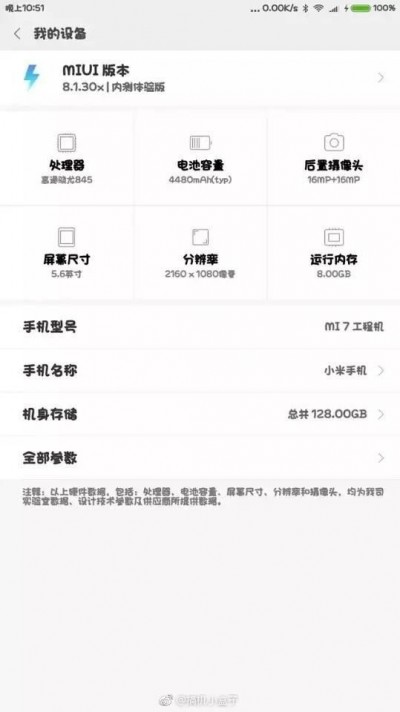
Xiaomi Mi 7 specs leak, 8GB RAM confirmed

Xiaomi said back in December that the Mi 7 will arrive at MWC 2018 with a Snapdragon 845, but according to some rumors, the company is postponing the announcement and bringing the Mi Mix 2s instead.
Still, a leaked screenshot of the Mi 7, said to debut in April, suggests 8 GB RAM and 4,480 mAh battery, a massive upgrade over the Mi 6’s 4/6 GB RAM and 3,350 mAh power cell.
Xiaomi Mi 7 specs leak, to come with 8GB RAM
Other specs reveal the already known Snapdragon 845, a dual camera setup (16 MP + 16 MP) and 5.6” tall screen with FullHD+ resolution. The storage is listed as 128 GB.
The screenshot says that the user interface version is MIUI 8.1.30x, which means the build is from January 30, 2018, not an old UI version. The company already updated 40 devices, including some 5-year old Mi phones to MIUI 9, so it's impossible the Mi 7 will run anything but that.

Saturday, August 26, 2017

Android 8.0 Oreo Update Schedules for Google Pixel, Nokia, OnePlus, Lenovo, Asus, Micromax Phones, and More

Android 8.0 Oreo Update Schedules for Google Pixel, Nokia, OnePlus, Lenovo, Asus, Micromax Phones, and More
Android 8.0 Oreo is the official name of the eighth major version of Google's mobile operating system.The OS will soon be headed to several smartphones currently running on Android Nougat, and who knows, maybe some will even jump straight to Android 8.0 Oreo from Android Marshmallow. But for now, the number of devices running Android 8.0 is minuscule, as only Google-backed devices are presently the only ones that have received the update. But worry not, several phones had been confirmed to be receiving the new software version when they were launched, long before Oreo was announced as the official name. There are a few brands that are known for sticking to a rigorous software schedule, even if they remain tightlipped about the Android 8.0 rollout plans for now. And some companies announced their plans soon after Oreo became official. So, if you are wondering if your smartphone will be upgraded to Android 8.0 Oreo, check the list below.

Android Oreo: 8 New Features You Need to Definitely Check Out

Android 8.0 Oreo update for Google Pixel, Pixel XL, Pixel C, Nexus 5X, 6P, Nexus Player

Android O updates for Google Pixel and Pixel XL smartphones, along with the Pixel C tablet from 2015 are available now. The latest version of Google’s mobile software will be rolled out as OTA update in a phased manner. Same is the case for the supported Nexus devices, namely Nexus 6P, Nexus 5X, and Nexus Player. If waiting for OTA is not your style, you can download the Android 8.0 Oreo image files, though you will lose all the data in the process.


Android 8.0 Oreo update for Lenovo K8 Note

The new Lenovo K8 Note is also scheduled to get the Android Oreo update, along with other K-series smartphones launched in 2017. However, there is no timeline for the K8 Note Android 8.0 rollout yet, as these will depend on chip manufacturer support, internal development and testing requirements, according to Anuj Sharma, Head of Product Marketing – Smartphones, Lenovo India.

Android 8.0 Oreo update for Asus ZenFone 3 and ZenFone 4 smartphones

When launching the ZenFone 4 and ZenFone 4 Pro, Asus announced it will release Android Oreo updatefor the smartphones in this year’s ZenFone 4 series as well as last year’s ZenFone 3 series. However, fans might have to wait to rather long for the update as the supported devices will get Android 8.0 by the second half of 2018.

Android 8.0 Oreo update for Micromax Canvas Infinity

At the launch of the new Micromax Canvas Infinity with 5.7-inch 18:9 FullVision display, the company announced it will provide the Android 8.0 Oreo update for the handset, but again, there is no timeline for it yet.

Android 8.0 Oreo update for HTC U11, U Ultra, 10

HTC has also joined the list of brands promising the Android 8.0 update for its smartphones, with the flagship HTC U11, along with HTC 10 and U Ultra first in line to get a taste of Oreo. Details of the rollout plans will “announced soon” by the Taiwanese brand, which will also release names of more devices getting the update.

Android 8.0 Oreo update for Moto and Nokia phones

Moto and Nokia are the two companies right now that offer the pure Android experience and promise swift updates to the latest version of the mobile OS. While all four Nokia Android phones will be getting Android 8.0, we can expect Moto’s 2017 range of smartphones to receive it as well. As for Moto phones from 2016, the likes of Moto G4 series to get the update as it still falls under the 18-month timeframe.

Android 8.0 Oreo update for OnePlus 5, 3T, and 3

The new OnePlus flagship, OnePlus 5 is confirmed to get Android Oreo, as are last year’s OnePlus 3 and 3T. However, it will be the last update for the 2016 OnePlus phones, as they will not be updated to Android P when it launches in 2019, the company has said.

Android 8.0 Oreo update for Essential Phone

The Essential Phone, unveiled in June by the ‘Father of Android’ Andy Rubin, will get software support for three years – that’s two years of Android OS updates and three years of monthly security updates. So it goes without saying Android 8.0 Oreo for Essential Phone is a definite go, along with the next major version.

Android 8.0 Oreo update for Coolpad Cool Play 6

While launching its flagship Cool Play 6 smartphone, Chinese brand Coolpad announced that the phone will be getting Android Oreo update by the end of the year. The smartphone will go on sale in India on September 4 via Amazon India, and run on Android 7.1.1 Nougat out of the box.

The list doesn’t include some of the major brands – Samsung chief among them – but we expect more brands to come forward with their Android 8.0 Oreo update schedules in the coming weeks. Google in its blog announcing the new flavour of Android mentioned “Essential, General Mobile, HMD Global Home of Nokia Phones, Huawei, HTC, KyoceraLG, Motorola, SamsungSharp and Sony are scheduled to launch or upgrade devices to Android 8.0 Oreo.” We will update this list as and when these or other brands announce their release plans.

China's 'Rejuvenation' Bullet Trains Are the World's Fastest

China's 'Rejuvenation' Bullet Trains Are the World's Fastest

China was once home to the world's fastest trains, but that position was temporarily derailed in 2011, after a crash between two bullet trains killed 40 people and injured nearly 200 more, leading officials to scale back maximum train speeds from 350 km/h (217 mph) to 300 km/h (186 mph).
But the country is getting back on track, as the next generation of bullet trains — said to be the world's fastest — began transporting passengers Monday (Aug. 21) on the Beijing-Tianjin Intercity Railway, according to the state-run Xinhua News Agency.    
Dubbed "Fuxing," which means "rejuvenation," the new high-speed trains are expected to expand service starting Sept. 21 to run between Beijing and Shanghai, traveling at speeds of up to 350 km/h (217 mph). But the trains are capable of going even faster. With maximum speeds of 400 km/h (249 mph), they are the fastest trains in the world, First unveiled in June, the Fuxing bullet trains were tested on July 27 at their maximum speed. They will operate seven round-trips daily between Beijing and Shanghai, and are expected to reduce travel time from 5 hours (at the current speed of 300 km/h) to 4 hours and 30 minutes, according to the Xinhua News Agency.
To put the speed of the Fuxing trains into perspective, the maximum speed of Amtrak intercity high-speed trains in the U.S. is 150 mph (241 km/h), and only half of the trains run at speeds of 100 mph (161 km/h) or more, according to the railroad's website.
Other types of transportation systems may promise ultra-high-speed travel, but they still have a long way to go before they're passenger-ready.
In Japan, testing is currently underway for trains capable of traveling at up to 500 km/h (310 mph) using magnetic levitation — so-called "maglev" technology — but they won't be operational until 2027. And billionaire entrepreneur Elon Musk's proposed "Hyperloop," a tube track that could carry people in air-cushioned pods at speeds of up to 760 mph (1,220 km/h), is still preparing for a preliminary testing stage, which will be conducted at 200 mph (322 km/h).

Android 8 review: Oreo is for everyone


Three years ago Google introduced us to its new design language called Material Design. It was flat, graphical and colorful. It was the visual change that ushered in the beginning of a new age for Android, one that focused less on the rapid expansion of Android’s feature set, and more on refining what already existed and paving the way for the future.
In many cases, Android’s maturation period included absorbing popular features that debuted elsewhere, whether in manufacturer skins, alternate launchers or via the custom ROM scene. More and more attention was placed on battery life, security, performance stability and fine-grained user-facing control. Not as sexy as a complete visual overhaul, perhaps, but vastly more significant.
Android 8.0 represents the current pinnacle of that effort, the very tip of the spear, fresh from Google’s workshop. Android 8.0 Oreo is as comprehensive a version of Android as there has ever been, and it is as stable, feature-rich and functional as ever. While on the surface it may lack grand visual changes, what lies beneath is stacked with usability improvements and polish.
The review that follows will be broken up into four key sections. The first will focus on the visual aspects of Oreo, the second section will look at those features offering greater control, the third will explore the ‘rapid access’ side of Android 8.0 and the last part will cover the smarter side of Oreo. If you want to see the development history of Oreo, take a look down memory lane with our Android O developer preview feature tracker.

1. Looking good

Between Android Nougat and Android Oreo there are no major visual changes, but those that exist have primarily been made to improve usability, increase consistency or add a layer of future-proofing to everybody’s favorite mobile OS.
The Settings menu is the most obvious place to start, as it has been further refined from what we saw last year. Most notably, the Settings menu in Oreo has been greatly reduced in size from previous versions of Android, with a lot more nesting of options under larger categories. For example, Network and Internet covers everything under that umbrella: Wi-Fi, mobile network, data usage, hotspot and tethering, VPN and airplane mode.
The Settings menu in Oreo has been greatly reduced in size, with a lot more nesting of options under larger categories.
The upshot of this is that the Settings menu is much shorter – just a page and a half on the Pixel – and is arguably more logical, even if it does require more taps now to access key settings like Wi-Fi or Bluetooth (both of which are, of course, easily accessible in the Quick Settings and at the top of the notifications shade).
The downside of this change is that in some cases the useful information shown below the main heading in Nougat, like, for example, the Wi-Fi access point or Bluetooth devices you are currently connected to, has been replaced with a brief summary of the settings within that category. Some Settings categories, however, like battery and storage, do still show that critical information.
Even within those categories things are kept simple. What Google considers to be more advanced options appear in a drop down menu. In the Display settings for example, you’ll only see four options up front: brightness, Night Light, adaptive brightness and wallpaper – the kinds of settings a casual Android user would need. Tap the caret next to Advanced though, and you’ll see the full gamut of display settings: display timeout, screen rotation, font and display size, screen saver, ambient display and so on.
For the most part, Oreo’s Settings look like Nougat (minus the slide-out hamburger menu): a largely monochrome affair on a light background with a few touches of a single color to draw your attention to key information, like Google’s Suggestions, which occasionally appear at the top of the Settings menu, or important features that have been activated, like Airplane Mode, Do Not Disturb or Data Saver.
The same lightening up of the UI can also be felt in the Quick Settings and notifications area. Swipe down once for the notifications shade and at the top you’ll see the six on/off toggles on a light gray ground, to keep things more visually consistent with the white notification cards below them. Above the toggles you’ll now see carrier info, status bar icons, battery info and the time, while the date is now found below the toggles in a more legible font.
Swipe down again and you’ll see the full Quick Settings area, which is tabbed if you have more than nine settings visible. As with Nougat, several toggles here simply activate and deactivate a setting, like the flashlight, Battery Saver or Airplane Mode. But others, including Wi-Fi, Bluetooth and Do Not Disturb, provide access to a mini menu so you can make minor changes without leaving the Quick Settings area.
You can rearrange the order of the Quick Settings, which will be reflected in the on/off toggles at the top of the notifications shade, and long-pressing an icon still takes you to the full Settings menu for that feature. You’ll also note that the User, Edit and Settings icons have now migrated to the bottom of the Quick Settings area for easier access on large-screened devices. Note: long-pressing the Settings icon here will still enable the System UI Tuner in the Settings, but it still only features toggles for status bar icons and some settings for Do Not Disturb mode.
Google has also streamlined the notification cards. If you have more notification cards than can fit on the screen, at the very bottom you’ll see a series of app icons indicating the remaining notifications. As you expand and contract the notifications list you’ll see those icons pop up into full notification cards or pop back down to the little icon tray.
Persistent notifications, like for apps running in the background (password managers, weather, Tasker and the like), will appear in more condensed notification cards, which you can expand for more information. Multiple notifications from the same app will still be bundled together as in Nougat, and Quick Reply for supported apps is still on board. For fans of Google Play Music, the media controls in the notification shade will now adopt the color palette of the album artwork, and this will be reflected in the lock screen background as well.
The launcher experience (at least on the Pixel) is much the same, but when you launch the app drawer, accessible simply by swiping up anywhere on the home screen, you’ll see the navigation buttons at the bottom of the screen switch from white to black for better visibility. Long pressing the home screen will bring up options for changing the wallpaper, adding widgets or accessing the home screen settings.
In the home screen settings you can enable or disable the app suggestions at the top of the app drawer, toggle what we used to call Google Now on or off, enable home screen rotation, decide whether you want new app installs to add an icon to your home screen and get access to two new Oreo settings: adaptive icons and notification dots (we’ll cover the latter a little further down).
Adaptive icons are one of the simplest ways Google has come up with to increase the consistency of the Android experience across devices from multiple OEMs, many of which use different shapes to Google.
Developers simply create a larger than necessary background for their app icon, which can then be masked with various shapes to create a more consistent look to the app icons on your phone.
The best part is that Oreo lets you decide which shape you like best: system default, square, round, rounded square, squircle or teardrop (like the Allo and Duo icons). Of course, not every app developer has jumped on board yet, but Android Studio has a simple wizard to guide devs through the process so it shouldn’t take long to catch on. If you want to know more about adaptive icons, read Gary’s excellent explainer on downloadable fonts and adaptive icons.
In terms of future-proofing the visual side of Android, Oreo has also included a couple of new features to keep up with the times. In previous Android versions, there was a maximum screen aspect ratio of 1.86:1, which is basically the widescreen cinematic standard. With the emergence of taller and narrower aspect ratios including 18.5:9 on the Galaxy S8 and Note 8, and 2:1 on the LG G6, Oreo no longer has a default maximum aspect ratio – it is simply the default aspect ratio of the device. Now we just need to get app developers on board to properly adapt their apps to the new formats.
Oreo also has built-in support for wide color gamut apps, essentially meaning that on devices with the requisite HDR display technology, apps can display a much larger range of colors. There aren’t a lot of phones out there with the necessary display hardware to take advantage of this yet, but that number will increase greatly as Android 8.0 Oreo continues to roll out next year.
And finally, everybody’s favorite: the Android Easter Egg and emoji. As discovered in the final Android O developer preview, the Android Oreo Easter Egg is an…octopus. He floats around the screen, changes sizes when you rotate your device and can be dragged around the screen. And…that seems to be about it.
Android 8.0 Oreo also officially delivers the new circular emoji at the expense of the blob emoji that were loved and hated in equal measure. We’ve written about this elsewhere on the site, including Google’s reasoning for making the change, so I’ll leave you to your brooding.
What I hope has been apparent in this section is that Google is finally paying attention to the small stuff. Lightening up the UI, introducing adaptive icons and new emoji may not seem like a big deal, but they make the Oreo experience more consistent. Condensing the Settings menus, moving icons around and collapsing persistent notifications make Oreo more usable. And adding full color gamut support while removing maximum aspect ratios ensures Android 8.0 will look great on devices that aren’t even out yet.

2. Taking control

Android 8.0 is also more about assuming control than any previous version of Android. Whether it’s Google putting the brakes on rampant resource-hungry app processes or users having more power to limit what apps can access and how notifications are handled, Oreo has it in droves.
New in Oreo is the ability to snooze notifications. Partially swipe a notification away and you’ll now see two icons: one leading to the notification channel settings for that app and another that sets a timer before the notification reappears. By default it’s one hour, but you can also choose from 15 minutes, 30 minutes or two hours.
Another key part of Oreo’s notification handling is the introduction of notification channels. Apps that target Oreo’s API 26 must include notification channels (while apps that don’t will continue to behave as they currently do). App developers then identify as many different types of notifications in their app as they like and Oreo lets users decide which app notification channels they want to be alerted to, and how.
Once you’re in the notifications settings for a particular app, you’ll see several options. You can disable notifications entirely, allow notification dots (more on this in the next section), or flip a switch for each kind of notification channel the app developer has identified. Some apps will have very few, but others, like the Google app, can have more than a dozen.
Each notification channel gives you three basic choices: disable it entirely, take it as is, or fine-tune it the way you like. For the first two, simply flip the switch to the on or off position. For the latter, tap the channel name and you’ll see various options including setting the importance for that notification channel (including the Urgent setting which makes use of a universal and thus, more consistent, app overlay alert type), changing the notification sound associated with it, enabling or disabling vibration, and so on.
Benefiting from notification channels is a gradual process - start with the defaults and limit particular notification types as they annoy you.
To do this for each and every notification channel in each and every app on your phone would be a herculean task, but what matters is the fact that it exists and you have complete control over it. Benefiting from notification channels is a gradual process: start with the defaults and limit particular notification types as they annoy you. Power users may want to devote their first weekend with Oreo to customizing every single notification on their phone, but everyone else can either ignore them or cherry pick as necessary.
Picture-in-Picture mode (PiP) is one of Android 8.0’s flagship features, previously available on Android TV, but not mobile. Primarily for video players and apps in which you watch content like Chrome, PiP lets you keep watching what you’re doing in a small floating window while otherwise going about your Android business – it’s a little like a free-form video version of split-screen, which also returns in Android 8.0.
In supported apps, hitting the home button will keep your video playing in a movable window in the bottom right of the screen. You can drag it around the screen and tap it to access playback controls or make it full screen. Of course, you can also disable this feature on an app by app basis if you don’t like it. Simply go to the App Info page for the app in question, or visit the Special app access section in Apps and Notifications to see all apps with support for PiP.
Background execution limits are one way Google has devised to throttle the amount of resources used by background processes. As you know, many apps like to keep various processes running in the background, whether to more quickly serve you notifications or to keep track of where you are. But you know what they say about giving someone enough rope, so with Oreo, Google has said enough is enough.
In Android 8.0, rather than allow apps to run rampant with your battery life in the background, Oreo limits their requests to scheduled windows of activity. Gary has covered how this all works in a great background execution limits explainer, but what it all means is better battery life for you and less strain on your device. By default, these limits only apply by default to apps targeting Android O, but you can enable them for any app by going to the Battery usage section in the App Info page and turning the toggle for Background activity off.
A couple of other features available prior to Android 8.0 Oreo are also aimed squarely at keeping you in the driver’s seat where your device security is concerned. Google Play Protect lets you know even before you install an app that it has been certified safe by the Google Play team. Then, Play Protect scans billions of apps in Google’s marketplace daily to ensure things stay on the up and up.
As in Nougat, Oreo makes a note on the App Info page of where each app was installed from. Previously, enabling Unknown Sources used to be a blanket action, but now each app that wants to download another from anywhere but Google Play must have permission granted on a case-by-case basis. This access can, of course, be revoked at any time.
Android Device Manager is now known as Find My Device, a much easier to understand method for tracking, locking down or remotely wiping a lost device. Both Google Play Protect and Find My Phone can be accessed either via the Security and Location section or by going to Settings > Google > Security.
You still have granular control over the app permissions granted to each app on your phone, either by permission category or on a per-app basis. But you can now also monitor special app access settings, like the ability to display over other apps, have unrestricted data access, use PiP mode or modify system settings. Again, these settings will not appeal to everybody, but as with everything else in Oreo, it’s a power user feature safely tucked away where it’s accessible but not confusing to the casual user.
Which brings us to Vitals. Announced earlier this year, Vitals is another initiative by Google to improve system performance and stability. It includes security tools, OS optimizations and various tools for developers to monitor their app’s usage on your device. Again, what all this analytics means is that app developers can optimize their apps for your device, giving you better battery life and app performance.
And finally, Android’s Accessibility options get a nifty new Settings menu area where you can enable an accessibility shortcut – including from the lock screen. Simply choose your preferred accessibility service, either Talkback, Select to Speak or Switch Access, and press and hold both volume buttons to activate and deactivate the service. You can even add a preset accessibility button to the on-screen navigation area.
The new settings have been kept largely out of sight to avoid cluttering up what has traditionally been a daunting OS for beginners
Like most of the other settings we’ve seen so far, Oreo still provides power users with the advanced tools and options they’ve come to expect from Android. But they are again kept largely out of sight to avoid cluttering up what has traditionally been a daunting OS for beginners. Google has also added a lot of stuff in the background to get you better battery life and performance than ever before, and that’s always a welcome addition.

3. Quicker access

From Google Now to Google Assistant, Google wants to deliver the most pertinent information when it is needed, if not just before. Each successive Android iteration has become more intuitive, with increasingly greater attention paid to helping you get things done faster. Nowhere is that more evident than in Android Oreo.
We’ll start with notification dots. Notification dots are Google’s answer to unread badges. A small dot, with a color matched to the app icon on which it appears, will alert you to any notifications you may have missed. Dots are visible in both the app drawer and on the home screen, and a long press of the app icon will reveal a condensed version of the available notifications. These can swiped away as per normal or opened up for action.
Notification dots are Google's answer to unread badges, nicely paired with app-specific launcher shortcuts.
When you long-press an app icon anywhere in Android 8.0, you’ll also get app-specific launcher shortcuts for each app. These are available whether or not a notification dot is present and can jump you straight into a variety of common actions.
For Twitter it might be search, post a tweet or send a DM. For Gmail you can compose an email or jump straight into one of your accounts and Photos will offer to free up space or take you to the search results for a particular set of your photos. Long pressing an app icon is also the quickest way to access the App Info page for each app or to add a widget.
Another speedy Oreo feature is smart text selection. This will be pretty familiar to anyone that regularly translates foreign words in Marshmallow or Nougat, but in Oreo it’s even smarter. Whereas Translate and Web Search were previously relegated to the overflow menu when you highlighted a section of text, Android 8.0 will not only anticipate the phrase you’re trying to highlight, but it will also predict which app you’re likely to want to use next and put it at the front of the copy/paste menu.
Following on from this, Oreo can learn your sharing habits too. On a basic level, Smart sharing connects apps with activities. So, for example, it will know to pair a photo of a receipt with an expense app or a selfie with messenger and social media apps. But Smart sharing will also begin to learn your habits and adapt to the apps with which you typically share specific types of content. It works with images, video, audio and text.
Android Oreo also introduces an improved Ambient Display. The familiar time and notification icons still ‘breathe’ on screen when you lift your device up, but now you’ll get larger notifications when a notification first comes in. Sadly, the ability to customize the lock screen shortcuts, present in the first developer preview, didn’t make it in the final build.
Further adding to the time-saving aspects of Android 8.0 is the new Autofill API, which promises to save you bucketloads of time on the web. Simply grant a service like Google’s Autofill or a password manager like LastPass permission to collect your passwords, credit card information and personal details and Oreo can offer to automatically complete web forms and log you into various accounts in future. Obviously, keeping your device safe and lock screen protected is essential here, but it’s a huge time saver.
One of the least touted features of Android Vitals is faster boot times. On the Pixel the boot up process is noticeably faster – twice as fast in fact. What used to take ages is now done in seconds, complete with a ‘powered by Android’ logo.
Whether it's through home shortcuts to popular app functions, smarter text selection, autofilling forms or simply booting your phone up twice as fast, Oreo will have you doing what you need to do in record time.
Meanwhile, Project Treble, which separates the vendor implementation from the Android OS framework, allows each to be updated independently. This means that OEMs can simply update the Android part of their phones without requiring anything from silicon vendors, which theoretically means you’ll get updates faster (I’ll believe it when I see it). Treble will be a part of all new devices launching with Oreo, although current Pixel phones are also supported.
As with other recent Android versions, Oreo wants to help you get to the things that matter quickly. Whether it’s through home shortcuts to popular app functions, smarter text selection, autofilling forms or simply booting your phone up twice as fast, Oreo will have you doing what you need to do in record time.

4. Being smarter

Android 8.0 is also the smartest of all Android versions, benefiting from the impressive Google Assistant and all the machine learning Google’s software has done over the last years. But there’s still room for some good old-fashioned man-made improvements too. Here are a few of the smarter decisions Google has made with Android Oreo.
High performance Bluetooth audio was one of the first Oreo features to capture the attention of the Android masses. Sony donated its LDAC codec to Google for inclusion in Oreo, opening up the mobile OS to superior audio connections on supported hardware. I won’t go into detail here, as Rob’s LDAC explainer and Oreo audio feature articles do the topic much better justice, but suffice to say Oreo supports audio quality that surpasses both what the human ear can discern or what the vast majority of high-end audio equipment can even reproduce.
High performance Bluetooth audio was one of the first Oreo features to capture the attention of the Android masses.
Bluetooth 5 support is another well-publicized feature of Android 8.0. Offering such enticing benefits as double the data throughput over short distances or quadruple the range with less throughput, Bluetooth 5 is a big deal.
There has been a lot of confusion surrounding the tech though, so much so that our very own Gary Sims has published several articles outlining what Bluetooth 5 does (hint: it has nothing to do with streaming audio), how effective it is and how many devices can make use of it yet (hint: close to none). Like HDR display support for full gamut color apps, Bluetooth 5 is an investment in the future. Fortunately, the first devices to launch with Bluetooth 5 hardware and Oreo out of the box are very likely right around the corner.
Oreo also delivers a new multi-display mode, which allows you to pick up on a large screen whatever you were just doing on the small screen. Your phone will also be able to detect which display it should be running on and switch back and forth seamlessly. TextView auto-sizing will allow app developers to let Oreo automatically resize the text in their apps according to the available screen real estate.
Mouse pointer capture is another forward-thinking addition in Android 8.0, which opens up Android-powered devices like Chromebooks and others to mouse input (physical keyboard support, including for navigation, has also been added). I tried it on the Pixel and it absolutely works as advertised but as you can probably imagine, it’s super weird to use a mouse with a smartphone.
Android Instant Apps are another new introduction we’ve covered in greater detail elsewhere, but the ability to use select functionality of apps you don’t actually install on your phone is a revolutionary idea. AIA will massively reduce the need for keeping those occasional-use apps on your device, freeing up storage space for things you want, like photos or music, while still allowing you to access all the benefits of app-based activities. Check out Adam’s great video on the significance of AIA.
Downloadable fonts are yet another under-the-radar Oreo feature that most people will never think about twice. The short version is that 800 Google supported font libraries can now be accessed via a ‘provider’ app. This means that rather than every app on your phone requiring its own font library, naturally resulting in duplicates, apps can now simply call upon a shared library in the provider app, further reducing app file sizes. The best news is that this feature has been back-ported to API 14 (Android 4.0). Upgradable graphics drivers also make their debut on devices that ship with Android 8.0 Oreo out of the box.
Pushing the memory management in a different direction now, Android 8.0 includes disk space limits for cached data too. Under this new system, each app on your phone gets a certain amount of storage space for cached data. But whenever the system needs to free up disk space, any cached files above that per-app threshold will be purged. The good news for users is smaller cached file sizes overall.
Android 8.0 Oreo expands the capabilities of the OS by baking in additions like Bluetooth 5 and Wi-Fi Aware – neither of which are even supported by any hardware yet.
On the Wi-Fi front, Oreo makes use of a service called Wi-Fi Aware, also known as Neighbor Awareness Networking. Wi-Fi Aware basically lets you create micro Wi-Fi networks with other devices around you without using a traditional internet access points. Apps will be able to communicate in both directions between connected devices, although at this moment no supported hardware is available, so stay tuned.
Android 8.0’s Wi-Fi Assistant allows you to enable the Assistant to automatically connect you to high quality public wireless networks. The setting is disabled by default but it can be flipped with a switch, accessible via your Wi-Fi preferences in Settings.
While some of these Oreo features are more behind the scenes, niche-level stuff, like Sony’s LDAC codec for high quality Bluetooth audio connections, others, like Android Instant Apps, have the potential to dramatically change the way we think about apps. At the same time, Android 8.0 Oreo expands the capabilities of the OS by baking in additions like Bluetooth 5 and Wi-Fi Aware – neither of which are even supported by any hardware yet.

Android Oreo features: final thoughts

I can confidently say that I’ve never been as impressed with a new Android version as I am with Android Oreo. Even the bugs that typically plague a new update in the days immediately following its release haven’t settled on my trusty Pixel. Unlike some, I even managed to get through the developer previews with barely a hiccup, certainly an encouraging experience for the now-public version I’ve been enjoying these past few days.
A lot of features first introduced in Android Nougat and before have found their true home in Oreo, which finally seems to get everything right. It will surely have its detractors, but even they will have to admit this is easily the most polished and reliable version of Android Google has ever released.
Like its namesake, Oreo very much strives to be the OS for everybody, and Android finally seems to get everything right.
As we mentioned at the beginning, and like its namesake, Oreo very much strives to be the OS for everybody. I can easily see how an iPhone user could pick it up and run with it, just as easily as I can see Android fans adoring all the new advanced features and customization options.
The fact that HTC, OnePlus, Lenovo/Motorola and even the Essential Phone are all basically using stock Android these days is a testament to great software. If you’re in the market for a new phone this year, rather than recommend this device or that, my suggestion would be to buy whatever will get you Android Oreo. Because for the first time in a long time, the software is the real star here, the hardware is simply the stage on which it shines.